YouTube moves to ‘small screen’

youtube_verizon.gif

An agreement between YouTube and US mobile firm Verizon Wireless will lead the popular video-sharing website extended to mobile phones. Users who subscribe to Verizon’s Vcast service will be able to view content on the YouTube website via their mobiles. The user can also post video clips from their phones to this site. Because of this feature anyone can capture small video clips using their mobiles and can upload them to YouTube directly. This will increase the use of YouTube as well as the popularity and usage of the mobile company. The trial of this will begin in this December.

Source : BBC

Related post : Its ‘YouTube’s turn now…

Technorati Tags : YouTube, Verizon wireless

Some new releases…

Spring 2.0.1 : This is the first maintenance release for Spring 2.0, including fixes for most bugs that have been reported since 2.0 final as well as many minor enhancements. This release also introduces OpenJPA support and GlassFish weaving support.

JUnit 4.2 : JUnit is a regression testing framework used for implementing unit tests in Java. Its new version JUnit 4.2 have released . This is a bug fix release. JUnit 4 takes advantage of Java 5 features like annotations, varargs, and generics to simplify unit testing still further.

JOOConverter 2.1.0: This is an Open Source Java/OpenOffice Document Converter, ie a tool to perform conversions between different office document formats. Its 2.1.0 version is released.

Technorati tags: Spring Framework, JUnit, JooConverter

MSOffice 2007’s Anti-piracy approach

In the new MSOffice 2007 microsoft is added a feature called Reduced Functionality Mode to stop piracy. This reduced Functionality mode is triggered whenever Office 2007 fails activation. In reduced-functionality mode, programs function similarly to viewers. When a program runs in reduced-functionality mode, many commands are unavailable or dimmed. Therefore, you cannot access those functionalities. Some of the limitations of reduced-functionality mode include the following:

  • You cannot create new documents.
  • You can view existing documents. However, you cannot edit them.
  • You can print documents. However, you cannot save them.

Reference : here

Related posts : MSOffice 2k7 User Interface, MSOffice 2k7 Package

Technorati Tags : MSOffice 2007, Microsoft

The new Office look …Woww !!!

Did you notice the Interface changes coming in the Office 2007 suite? The following are some of the features and screenshots of this. I am sure you will defenitely love this new, attractive interface and graphics. 🙂

Most of them will be the new trends of Interface design. For example the concept of “Contextual Tabs”. This is called as the heart of the new user interface….

The screenshots given below are taken from official blog of Mr. Jensen Harris and if you want to read more about this topic then please visit here and here

  • The Ribbon

The traditional menus and toolbars have been replaced by the Ribbon — a new device that presents commands organized into a set of tabs.The tabs on the Ribbon display the commands that are most relevant for each of the task areas in the applications.

word-ribbononly.png

Word-ribbon

excel-ribbononly.png

Excel-ribbon

powerpoint-ribbononly.png

Powerpoint-ribbon

  • The Microsoft Office button

a single central location where a user can see all of these capabilities like share, protect, print, publish, and send in one place. File-level features were mixed in with authoring features.
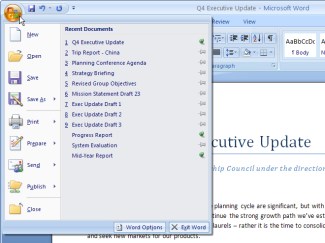
officebuttonms.jpg

New MSOffice button (Central Point)

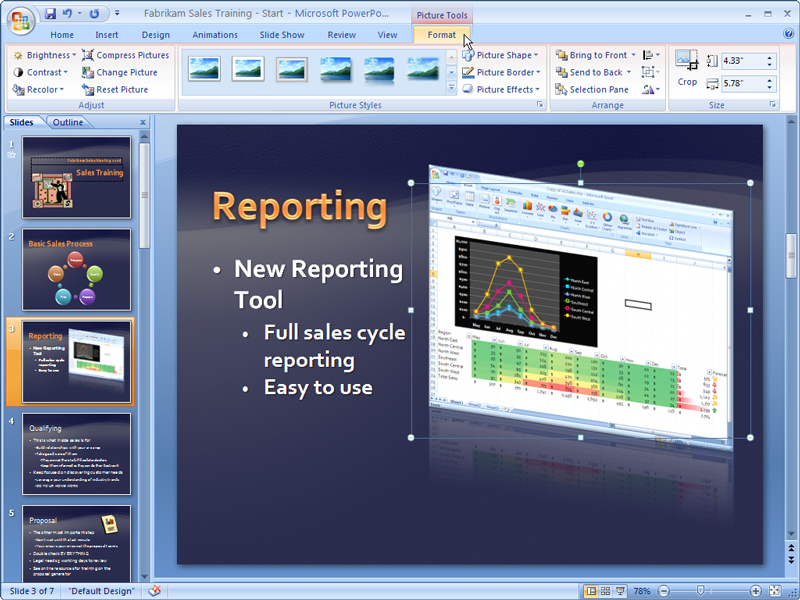
  • Contextual Tabs

The Contextual Tabs contain all the features you need for working with the selected object.The way it works is this: The default tabs for the application contain only the commands that are not object-specific. It turns out that this drastically simplifies the functionality you have to look through because so much of Word, for example, only works when you have a Table or a Chart or a Picture or a Header or a Drawing or a Text Box selected.

contextual-tab.jpg

Contextual Tab


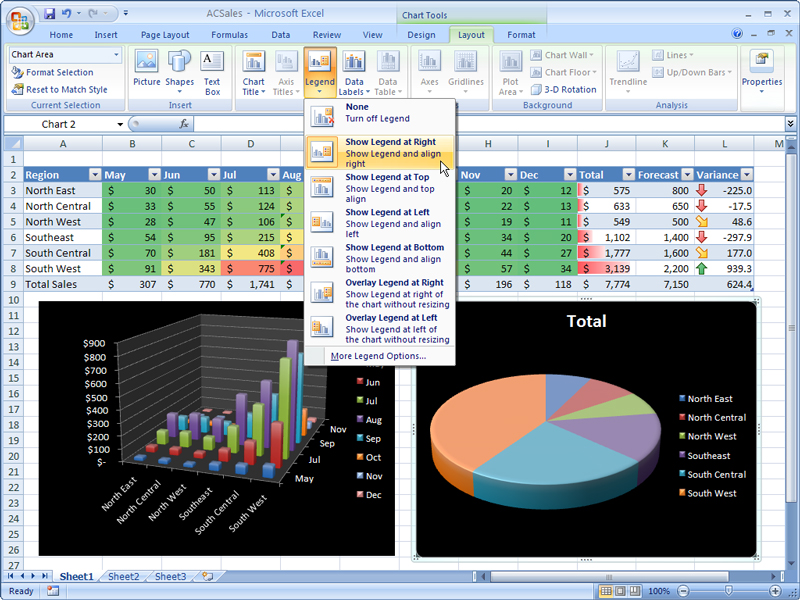
  • Galleries

Galleries are the other huge attraction of the redesigned applications. Galleries provide users with a set of clear results to choose from when working on their document, spreadsheet, presentation, or Access database.

gallery.jpg

Gallery

Technorati Tags : MSOffice 2007, Microsoft, Softwares

Design a site like this with WordPress.com
Get started